Kanban guest pipeline
Kanban Board for Event Guests
Your guest list as a pipeline.
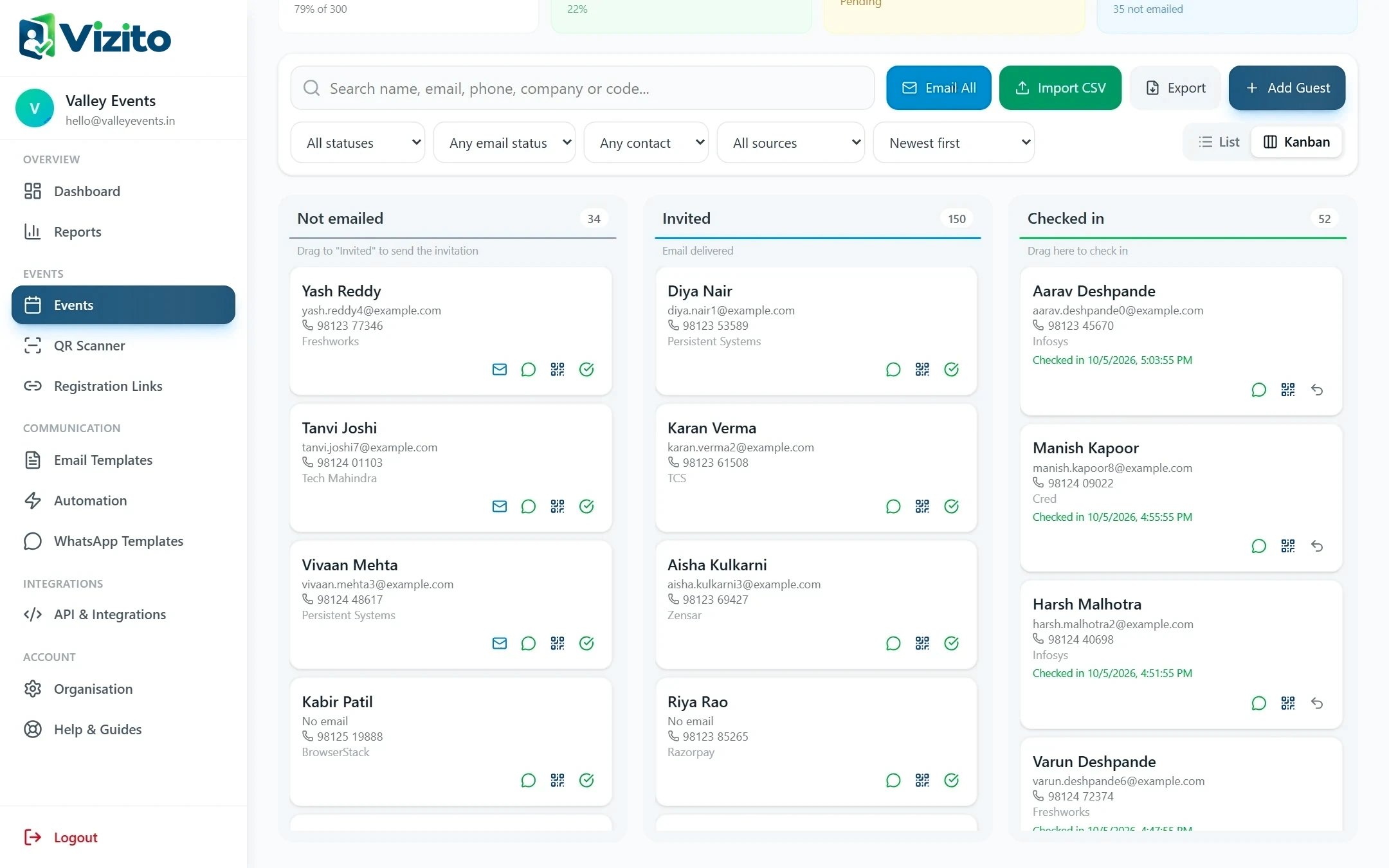
The kanban view groups guests into stages: not emailed, invited and checked in. It makes progress obvious at a glance and turns common actions into a simple drag and drop.
Why it matters
Why teams use Kanban guest pipeline in Vizito
Progress at a glance
Column counts show how many guests are waiting for an invitation and how many have arrived.
Drag to invite
Moving a card to Invited sends that guest their invitation.
Drag to check in
Moving a card to Checked in marks the guest as arrived.
Same filters
Search and filters apply to the board just like the list view.
How it works
Up and running in minutes
- 01
Switch to kanban
Choose the kanban view in the event's guest list.
- 02
Drag cards
Move guests between stages to invite or check them in.
FAQ
Questions about Kanban guest pipeline
Does moving a card really send an email?
Yes. Moving a guest to Invited sends their invitation email, and moving them to Checked in checks them in.
Keep exploring
Related features
Seamless Events, All in One Place
Start using Kanban guest pipeline today.
Create your account, add your first event and start sending QR passes in minutes.
- No app to install
- Works on any phone
- Set up in 5 minutes